A shopper opens ChatGPT and types: "waterproof barn jacket under $200 with free returns." The model does not browse the way a person does. It assembles a shortlist from data it can already read and trust, then explains its picks. Three stores sell almost the same jacket. Two make the list. The third is invisible — not because its jacket is worse, but because its product page never told a machine the price, the stock status, or the return window in a form the model could quote.
That third store is the common case, and the fix is rarely a redesign. It is a few fields of structured data. This is a field-by-field guide to the ones that decide the outcome. For the wider picture of why machine-readability now drives discovery, see what AI shopping readiness actually means.
How an AI buyer reads a product page
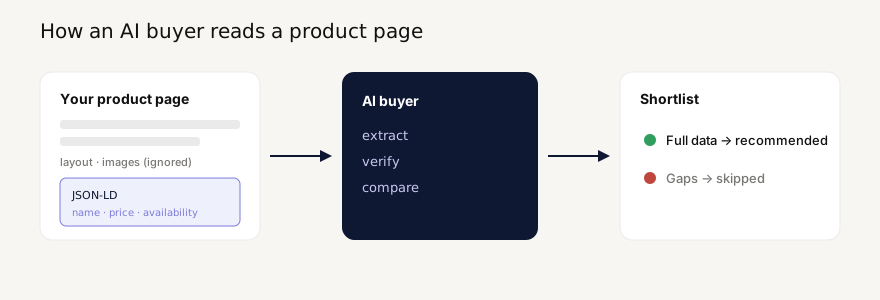
An agent does not see your hero image, your typography, or your "Add to cart" button. It reads the machine-readable layer underneath — primarily the JSON-LD Product block in your page source. Everything visual is decoration it cannot cite.
This has a blunt consequence. If a fact is not in structured data (or in clean, parseable HTML), the model either guesses or omits it. And when it is comparing several stores for one query, omission usually means exclusion: it recommends the store whose data it can read unambiguously over the one it would have to guess about. The bar is not "is my page good." It is "which fields can a machine extract, and are they correct?"
First, the agent has to reach the page
Structured data is worthless if the crawler never arrives. Before any of the fields below matter, confirm your robots.txt does not block the AI crawlers — GPTBot, ClaudeBot, PerplexityBot, Google-Extended — and that your product URLs are in your sitemap. A surprising number of stores quietly disallow these agents, then wonder why they never appear in AI answers. Crawlability is 20% of a Prefero score for exactly this reason; see how the score is calculated. Once the page is reachable, the data layer decides everything else.
The eight fields that matter
Schema.org defines dozens of Product properties. Most carry little weight for a buying decision. These eight do the work:
| Field | Why an AI buyer needs it |
|---|---|
name | Matches the product to the query. Vague or templated names ("Item 4471") cost you. |
offers.price + priceCurrency | A parseable number is the only way to satisfy "under $200." A price baked into an image is unreadable. |
offers.availability | InStock / OutOfStock. The model will not recommend what it cannot confirm is buyable. Missing availability is the most common reason a product is silently dropped. |
brand | Disambiguates identical names and answers brand-specific queries. |
image | A direct, absolute image URL the agent can show in its answer. |
description | Where the model reads features it cannot get elsewhere — material, fit, use case. |
aggregateRating / review | Social proof the model weighs when two products are otherwise equal. |
sku / gtin | Stable identity. Lets an agent recognise the same product across stores and merge signals. |
If you only fix three, fix name, price, and availability. They are the fields a comparison query filters on first.
A minimal Product block that works
You do not need every property. You need the load-bearing ones, correct and consistent. This is a complete, valid starting point:
<script type="application/ld+json">
{
  "@context": "https://schema.org",
  "@type": "Product",
  "name": "Fenwick Waxed Barn Jacket",
  "brand": { "@type": "Brand", "name": "Fenwick" },
  "image": "https://example.com/img/barn-jacket.jpg",
  "description": "Waxed-cotton barn jacket, water-repellent, corduroy collar.",
  "sku": "FEN-BARN-OLV",
  "offers": {
    "@type": "Offer",
    "price": "179.00",
    "priceCurrency": "USD",
    "availability": "https://schema.org/InStock",
    "url": "https://example.com/barn-jacket"
  }
}
</script>
Two details people miss: price is a plain string with no currency symbol ("179.00", not "$179"), and availability is a full schema.org URL, not the bare word InStock. Models and validators accept the precise form and stumble on the loose one.
Three mistakes that get you dropped
1. The price lives only in the design. Plenty of stores render the price in an image, a web component, or a script that runs after load. A person sees it instantly; an agent reading the source sees nothing. If the number is not in JSON-LD or plain HTML text, you cannot be filtered into a price-bound query.
2. availability is missing or stale. A product with no availability field reads as "unknown," and unknown loses to "in stock." Worse is availability that claims InStock while the visible page says sold out — which leads straight to the third mistake.
3. The data layer and the page disagree. When JSON-LD says $180 and the visible page says $200, the model cannot tell which is true, so it discounts both and trusts a competitor instead. Structured data is a promise, and a broken promise is worse than silence. Keep the two in sync, ideally generated from the same source.
The store with the clearest, most consistent data wins the recommendation — not necessarily the store with the best product.
How to check yours in five minutes
Open your best-selling product page, view source, and search for application/ld+json. If you find a Product block, confirm it has name, price, priceCurrency, and availability, and that each matches what a shopper sees. If you find nothing, that is your afternoon's work — and likely the difference between being shortlisted and being skipped.
If you would rather measure it than read source by hand, run your store through Prefero: it extracts the same fields an AI buyer would, scores them, and shows exactly which are missing. Scan your store free at prefero.me.