In 13 of the 33 scans we completed between June and July, the scanner extracted zero products from the store. Not zero structured data — zero products. The pages were live and the stores were taking orders, but an agent crawling the catalog could not enumerate a single item to evaluate.
An AI buyer works in two steps. First it finds candidates — by crawling a sitemap, category pages, and feeds. Then it filters them — by reading attributes such as color, size, and price. Stores invest almost everything in step two: the JSON-LD on the product page. The discovery layer that powers step one — category pages, item lists, faceted URLs — usually stays a paginated grid with no machine-readable structure at all. The result is a store an assistant can read perfectly one product at a time, and cannot browse at all. A catalog that a machine cannot enumerate loses the recommendation before the comparison ever starts.
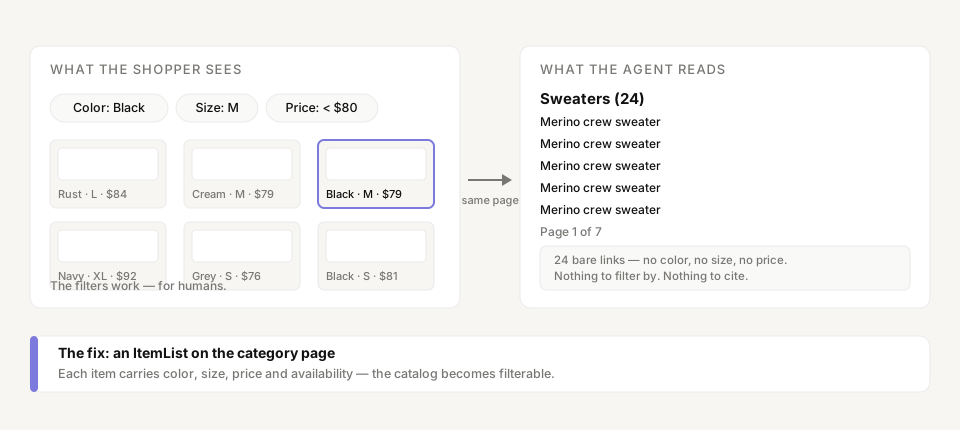
Two steps: find, then filter
When a shopper asks ChatGPT or Gemini for "a black merino crew-neck under $80," the assistant receives a set of constraints: category, color, material, budget. Answering requires two operations in strict order. Build a candidate set — which products exist on this store? Then apply the constraints — which of them match?
A language model cannot browse the way a shopper does. It fetches a bounded number of pages and reads them as HTML and structured data, with a much smaller fetch budget than a search-engine crawler. Products that cannot be reached within that budget do not enter the answer, no matter how well-marked their individual pages are. The 13 zero-product scans above ended neutral because the pipeline could not enumerate the catalog — there was nothing to put in front of the buyer model. Those stores averaged 19.2 overall readiness, the weakest cohort we have measured. The same wall showed up in a wider sample: 11 of 30 stores had zero AI-readable product data.
The product page is the wrong place to start
Merchants who learn about structured data fix the product page first, because every guide points there. The product page is where the comparison happens — but only for products the agent already found. Discovery happens one level up: the category page, the sitemap, the site search, the feed. An agent arrives at a product page through a link from one of those surfaces. If the surfaces expose bare pagination links, the crawl becomes a lottery: page one gets read, page two maybe, page seven never.
Google's Search Central guidance on faceted navigation makes the same point from the crawl-economics side: filter combinations multiply URLs into the thousands, and crawlers spend their budget on near-duplicate pages. A chat assistant operates under the same economics with a tighter budget, and it has no months-long crawl schedule to catch up later. The store that wins is the one whose first few fetched pages already describe the catalog — or at least its top sellers, with attributes attached.
The filter vocabulary already exists
Nothing about this fix needs new standards. schema.org defines ItemList as an ordered list of items — a category page is an ItemList wearing a grid layout — and BreadcrumbList for the hierarchy above it. Every attribute a filter needs already has a name on Product: color, size, material, pattern, sku, gtin, and offers with price and availability. These are the same fields the product page should carry, and they work identically on a list item:
{
  "@context": "https://schema.org",
  "@type": "ItemList",
  "name": "Sweaters",
  "itemListElement": [
    {
      "@type": "ListItem",
      "position": 1,
      "item": {
        "@type": "Product",
        "name": "Merino crew sweater",
        "url": "https://store.com/sweaters/merino-crew-black",
        "image": "https://store.com/images/merino-crew-black.jpg",
        "color": "Black",
        "material": "Merino wool",
        "offers": { "@type": "Offer", "price": "79.00", "priceCurrency": "USD", "availability": "https://schema.org/InStock" }
      }
    }
  ]
}
The fields do double duty: they are what the shopper's filter chips represent, and what the agent needs to honor the constraint. "Black" only filters if color is a field somewhere on the candidate — on the list item itself, or on the product page the agent would have to fetch one by one. A category page listing 24 products with those fields attached is a filterable catalog. The same page with 24 links and nothing else is pagination soup. We covered the variant side of this vocabulary — the fields a size or color decision actually needs — in Shoes without sizes.
What a readable catalog looks like
Four moves, none of them a replatform:
- Put an
ItemListon your top category pages. Name, URL, image, price, availability, and the attributes shoppers filter by — at leastcolorandsizefor apparel,materialfor furniture. Top sellers are enough to start; the catalog's Pareto front is what an agent fetches first. - Add
BreadcrumbListto every category and product page. Hierarchy is how an agent understands that "sweaters" nests under "menswear" — and how it answers a question about a category it never opened. - Make facet state live in the URL.
/sweaters?color=blackmust return black sweaters. A filter that works only inside a session is invisible to a fetcher; a filter encoded in the URL is a page an agent can request. - Put category pages in the sitemap. Most sitemaps list only products. The catalog's table of contents — the pages that enumerate the products — is what a crawler uses to find them.
None of this competes with product-page work. It completes it. The product page is where the comparison happens; the category layer is how the product gets into the comparison.
What changes when the agent can browse
When enumeration works, an assistant can honor a constrained query instead of guessing at it — it can return "black, merino, under $80" as three verified facts rather than one plausible product. The gap between "found" and "not found" is not a matter of degree. Readiness for AI buyers is binary at the catalog level: the store either exposes a readable set of products, or it does not participate. In our June–July window, the stores whose catalogs an agent could read were the ones that produced scores; the 13 that exposed nothing averaged 19.2.
The pattern repeats across the whole readiness spectrum because the discovery layer is the most under-invested surface in e-commerce. Product pages get redesigned quarterly; category pages are templates nobody owns. For a human shopper, that asymmetry is invisible — the grid renders either way. For a machine, it is the difference between a catalog and a hallway of doors with no doorknobs.
What to do first
- Pick your five highest-traffic category pages and check what an agent can read from them today: open the page source and look for
ItemListorBreadcrumbList. Most stores will find neither. - Generate the
ItemListblock from the same product data the grid already renders from. One template change; it updates itself. - Scan your store to see how many products an agent can enumerate end to end — the count that decides whether your catalog exists in AI answers at all.
See how much of your catalog an agent can browse. Run a free scan at prefero.me.