The most expensive asset on a fashion store's product page is the photograph — and it is close to worthless in the evaluation that increasingly decides which products get recommended. An AI buyer shortlisting twenty parkas for "a warm waterproof jacket under $300" does not download and study twenty hero images. It reads the text layer around each one.
Everything the photo communicates — true color, fabric, silhouette, fit — counts in the agent's decision only if it also exists in machine-readable form: a schema field, an alt string, a sentence of description. A photograph is not a data point. It is a decoration the evaluator skips. For stores whose entire differentiation is visual — fashion, furniture, jewelry, home decor — that is not a small handicap, it is the whole game. And the fix is not better photography. It is translation: moving the photo's information into the fields an agent actually reads.
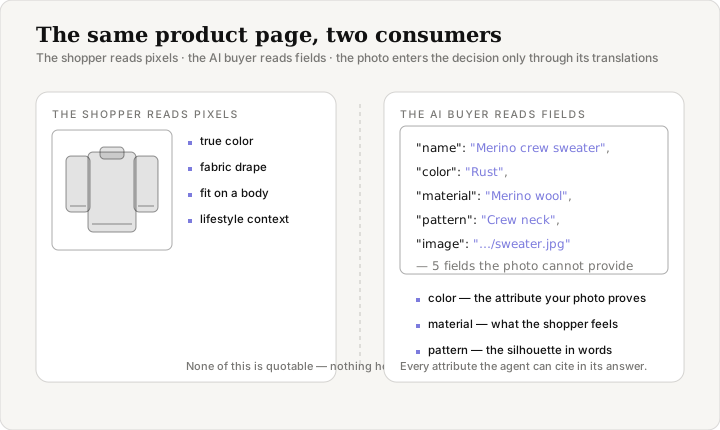
The evaluator that never opens the image
When an AI buyer works through a category, it does not experience your page the way a visitor does. The default pipeline is text: the agent fetches the HTML, extracts the structured data and the prose, and compares products on the fields it found. This is how Google's own rich-results machinery works — product snippets are built from JSON-LD, not from looking at the photograph — and it is how general-purpose assistants behave when they compare catalog items they have never seen. The comparison runs on strings, not pixels.
None of this is because the models are blind. Several are genuinely multimodal: attach a screenshot of a jacket to Gemini or ChatGPT and the model will read the pixels, down to the stitching. Visual search works the other way around — the shopper's own photo becomes the query. But neither path rescues your hero image in the default comparison. When the agent is choosing between your store and a competitor, nobody attaches your photo to anything. The evaluation runs on the text layer, so the photo enters the decision only through its translations.
What the photo communicates — and what survives
Consider what a shopper actually gets from a product photograph, and what a machine can read of that same information.
| What the shopper gets from the photo | What a machine can read of it |
|---|---|
| The true color — rust, not orange | Product.color — the field most stores skip |
| The fabric and its weight | Product.material — free text, rarely filled |
| The silhouette, neckline, cut | Product.pattern or prose in the description |
| Fit on a real body | Only what the description claims |
| Mood and lifestyle context | Nothing — and nothing needs to |
The gap between the two columns is the tax visual stores pay, and it is paid exactly where their differentiation lives. A store selling USB cables loses little: the photo adds almost nothing a spec sheet does not already say. A store selling hand-finished ceramics loses everything: the glaze, the irregular edge, the scale of the piece — the reasons a shopper picks it over the mass-produced alternative — all exist only in pixels, and pixels do not get quoted.
The three fields most stores skip
schema.org defines Product properties that exist precisely because a machine cannot look at a picture: color, material, pattern, size. They are the vocabulary of visual attributes, and they have been there for years. A product template that fills them costs nothing extra — the values come from the same product object the page already renders from.
{
  "@context": "https://schema.org",
  "@type": "Product",
  "name": "Merino crew sweater",
  "image": "https://store.com/images/merino-crew-rust.jpg",
  "color": "Rust",
  "material": "Merino wool",
  "pattern": "Crew neck"
}
What changes when those five lines exist: a shopper asking for "something rust-colored, not orange" can actually be answered. Without color, the agent cannot honor the filter — it cannot see the sweater to know. Without material, a question about wool is unanswerable. The photograph proves all of it to a human in half a second; the fields are the only proof a machine can cite. Google's product structured data documentation lists image as a required property for product snippets, and color, material, and size among the recommended ones — a fair summary of how the largest AI shopping surface treats the photo's attributes: display it, and describe it in fields.
For the full eight-field baseline that carries the most weight with an AI buyer, see the Product schema fields that decide whether AI recommends you.
Alt text is the caption a machine actually reads
The second translation layer is older than structured data: the alt attribute. For two decades its audience was assistive technology and search engines. It now has a third consumer — the agent that summarizes your page and needs to say what the product looks like without opening the image.
The W3C's Web Accessibility Initiative has spent two decades making the same point: alt text should describe the image's content and purpose. That guidance, written for screen readers, happens to be exactly what a machine extracting visual information needs. "Rust merino wool crew-neck sweater, front view" tells both audiences what the photo shows. "IMG_4829.jpg" tells neither. And the default auto-generated string most platforms emit — the file name or the word "product image" — actively wastes the slot.
This is the rare fix with no conflict of interest. Accessibility and machine readability are the same string. One edit improves the experience for a screen-reader user and gives the agent its only surviving description of the product's appearance. The top 20% of your catalog drives most of your revenue; writing real alt text for those products is an afternoon.
Being displayable is not being evaluated
It is worth separating two jobs that look the same. Product.image does one thing well: it gives the agent a thumbnail to show in its answer. Both finalists in a comparison can be displayable. The one that gets recommended is the one the agent can justify — and the justification needs reasons a model can state: the color matched the request, the material was named, the return policy was readable.
A store can win the photo and lose the recommendation. The agent shows the prettier image and then cites the competitor whose fields let it answer the shopper's actual question. Display is the answer card; evaluation is the choice that fills it. They run on different data.
The same split shows up in product feeds. Google Merchant Center requires an image URL for every item — the photo travels everywhere a feed goes — and the feed still cannot tell a machine that the jacket is waterproof unless the attribute fields carry it. We covered what Merchant Center does and does not do for AI buyers in the Google Merchant Center gap.
What to do first
Four moves, in order of effort:
- Add
color,material, andpatternto your product template. One template change, populated from fields your product data already has. This is the single highest-value fix for a visual category. - Write real alt text for your top products. One sentence describing what the photo shows, for your best 20%. Accessibility and AI extraction improve together.
- Make each description answer attribute questions. "Waterproof, taped seams, 650-fill down, hood packs into the collar" is four machine-citable claims. "The perfect companion for winter adventures" is none.
- Measure the gap before you fix it. A scan tells you which fields an agent can already read from your store, so you translate the photo where it matters instead of everywhere.
The photograph was never the problem. The problem is that everything it says stays inside the frame. Move the information out — into fields, alt text, and descriptions — and the evaluator that cannot see the picture can finally read the product.
See what an agent can read from your store. Run a free scan at prefero.me.