Ask an assistant to find the cheapest place to buy a specific espresso machine, and it can only answer if it can prove that the machine on store A is the same machine as the one on store B. The proof is a string of digits — a GTIN, an MPN, a brand-plus-model pair — and most independent storefronts publish none of them anywhere an agent can read.
AI buyers do two things with a product page: describe it and match it. Description is solved — name, price, and availability in JSON-LD have been standard advice for a decade. Matching is not. Matching is what turns "this page sells the Barista Pro 2 for $229" into "this is the same Barista Pro 2 that two other stores sell for $219 and $240, and here is the cheapest". A page without an identifier can be quoted; it cannot be matched. And an agent that cannot match a product will not compare it — it will describe a competitor's product instead. The fix is one template change: publish gtin, mpn, and brand in your Product JSON-LD.
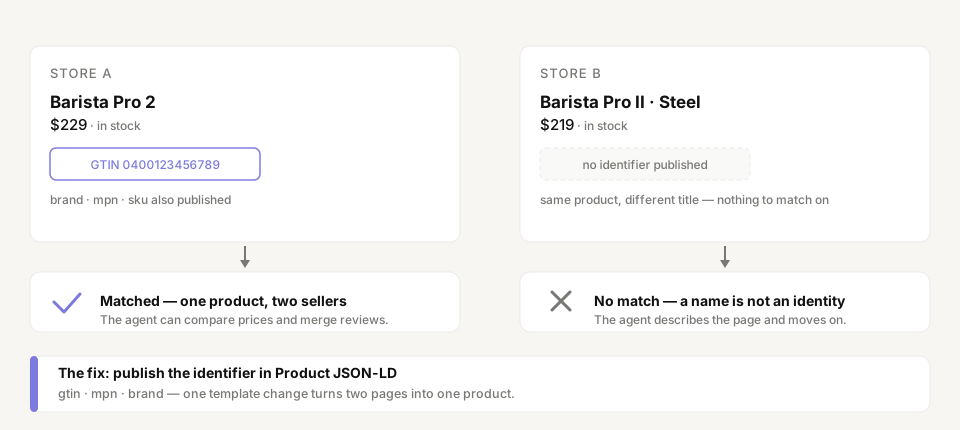
Readable is not matchable
Every serious shopping assistant works over an entity graph. Google describes its Shopping Graph as a model of the relationships between products, sellers, brands, reviews, prices, and availability across the web. The connective tissue in that graph is the identifier: the barcode on the box is what tells the system that two pages six thousand kilometres apart describe one product.
An agent answering a cross-store question performs the same resolution on a smaller budget. "Who sells this cheaper?" requires confirming identity across sellers. "Is this the same chair I saw yesterday?" requires re-resolving a product from a name the shopper may have misremembered. "Which of these two listings is the newer model?" requires distinguishing products that share almost the same title. A name string alone resolves none of these — thousands of products share a name, and the same product carries different names on different stores. Identity travels in structured identifiers, not in prose.
Stores skip identifiers more than any other SEO-critical field. In our 120-store benchmark, four stores cleared a completeness threshold of 70 — and the missing fields were consistently the same: brand, a product identifier, aggregateRating, return policy, shipping. The field that carries product identity is the field most product pages leave out.
What carries identity
Three fields, and one that does not do what merchants assume it does:
gtin— the barcode, governed by GS1. Published asgtin8,gtin12,gtin13, orgtin14depending on the barcode's length. It identifies the exact product across every seller, marketplace, and country. This is the strongest identity signal a page can carry.mpn— the manufacturer part number. Identity within a brand's catalog. A store selling someone else's goods almost always has it on the invoice or the box.brand— the maker. Too coarse on its own — a brand sells thousands of products — butbrand+mpnis the standard fallback pair when no GTIN exists.sku— internal only. It is meaningful to your inventory system and to nobody else; an agent cannot match another seller's page with it. Keep it for yourself, do not expect it to resolve identity.
For private-label and own-manufacture products there is genuinely no GTIN, and Google's product data specification formalises the honest answer: publish identifier_exists: false and lean on brand + mpn. An explicit "no identifier assigned" is a signal. Silence is not.
The complete block, on the page today:
{
  "@context": "https://schema.org",
  "@type": "Product",
  "name": "Barista Pro 2",
  "brand": { "@type": "Brand", "name": "Brewtek" },
  "gtin13": "0400123456789",
  "mpn": "BT-PRO2-SS",
  "sku": "BP2-SS-01",
  "offers": {
    "@type": "Offer",
    "price": "229.00",
    "priceCurrency": "USD",
    "availability": "https://schema.org/InStock"
  }
}
None of these fields is new. gtin13, mpn, sku, and brand have been part of schema.org Product for years. The fields were always there; the use case for them just arrived.
Why the fields went missing
Four reasons, none of them malice:
- The SEO decade taught name, price, availability. Those three drove rich results, so guides stopped there. Identifier fields were optional garnish — they influenced nothing a merchant could see, so nothing emitted them.
- Themes print a minimal
Productblock. The platform knows the SKU and often the MPN in the catalog backend; the theme that renders the JSON-LD never asks for them. The data exists one database table away from the page. - The feed and the page are different worlds. Merchants who sell through Google Merchant Center already have
gtinandmpn— in the feed. The feed goes to Google's servers and never touches the page. The identifier exists in exactly one place, and that place is not the page an AI agent fetches. - Resellers import catalogs without identifiers. A store built from marketplace or dropship data inherits whatever the source had — often nothing — and the identifier never enters the store at all.
The result is a page that answers every question about itself and no question about anything else: it is fully describable and completely unmatchable.
What an identifier unlocks
- Cross-store price comparison. "Find the cheapest place to buy this" is the single most common shopping-agent question, and the only one that cannot be answered from one page. It is an identity operation. Without a match, the honest answer is "I can't confirm these are the same product" — and the shopper gets the store the agent can confirm.
- Follow-up questions across sessions. "Is this the same one I was looking at earlier?" forces the agent to re-resolve the product from memory. Different stores title the same product differently; only an identifier survives the round trip.
- Reputation that accumulates. Reviews, ratings, and availability from many sellers attach to the entity, not to each page. A product with an identifier inherits the signals already attached to it; a product without one starts from zero every time it is described, because nothing says it is the same product as the last one.
- Variant resolution. Every size and colour of a product has its own GTIN, which is how an agent distinguishes the 40 cm pan from the 60 cm one before the shopper ever asks. We covered the variant side of this in Shoes without sizes.
Publishing your identifiers
- Find them. The manufacturer's invoice or the box carries the GTIN and MPN. Better: export your Merchant Center feed — the
gtinandmpncolumns are already filled in. Private label? Skip to step 5. - Add them to the
ProductJSON-LD.gtin13(orgtin12/gtin14),mpn,sku,brand— one template change, or one setting in the schema app you already run. - Add them to list items too. If your category pages emit
ItemList, each item can carry the same fields — the agent then matches products at the discovery layer, before it ever fetches a product page. - Keep the feed and the page identical. A page whose
gtindisagrees with the feed'sgtinis worse than a page with none — an agent that finds two identifiers for one page distrusts the page. - If there is no GTIN, say so. Publish
brand+mpn+skuandidentifier_exists: falsein the feed. An explicit absence is structured data; an implicit one is nothing. - Validate. Run the page through a schema validator and confirm the identifier renders as a property of
Product, not a line in the footer.
Identifiers sit inside the structured-data dimension of our scoring — the 40% that determines whether a store exists to an AI buyer at all (methodology). It is the cheapest field on the page and the only one that works across stores: a name describes your product, an identifier is your product.
See which identifiers your product pages actually publish. Run a free scan at prefero.me.