In our scans of 30 e-commerce stores across nine categories this summer, 11 returned nothing an AI buyer could read — zero structured product data on any page. The fix for most of them took an afternoon. The harder problem is that most merchants do not know the gap exists until someone runs a scan.
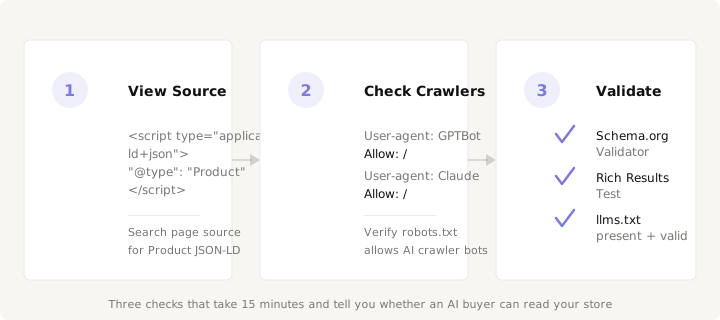
You do not need a scan to find the gap. Three manual checks — all doable with a browser, a text editor, and 15 minutes — tell you whether your store is readable by ChatGPT, Gemini, Perplexity, and every other AI agent that now drives purchase decisions. This is the same audit we run at the start of every Prefero scan, and you can run it yourself right now.
Check 1: Does your product page speak JSON-LD?
Open any product detail page on your store. Right-click and select "View Page Source." Search for "@type": "Product".
If you find it, look at what it contains. A usable Product block needs at minimum five fields:
name— the product name, exactly as it appears to a shopperoffers— anOfferblock withprice,priceCurrency, andavailabilitybrand— aBrandobject with anameimage— at least one product image URLdescription— the product description, as plain text
A minimal valid block looks like this:
{
  "@context": "https://schema.org",
  "@type": "Product",
  "name": "Waterproof Trail Jacket",
  "image": "https://store.com/jacket.jpg",
  "description": "A waterproof trail jacket with taped seams.",
  "brand": { "@type": "Brand", "name": "TrailCo" },
  "offers": {
    "@type": "Offer",
    "price": "189.00",
    "priceCurrency": "USD",
    "availability": "https://schema.org/InStock"
  }
}
If you find no "@type": "Product" anywhere in the page source, an AI buyer visiting your store sees the equivalent of a blank form — it can guess at the price and availability from the visible text, and it often guesses wrong. In our scan data, stores with zero structured data averaged 23 out of 100 on overall AI readiness. Those with at least valid product schema averaged 83.
If you found the block but it is missing fields, note which ones. Missing price is the most damaging single gap: an AI buyer asked to recommend "a jacket under $200" cannot compare your store if it cannot extract your price as a number.
Check 2: Can AI crawlers reach your store?
Open /robots.txt on your domain — e.g. https://yourstore.com/robots.txt. Look for lines that block AI-specific user agents:
User-agent: GPTBot
Disallow: /

User-agent: anthropic-ai
Disallow: /

User-agent: PerplexityBot
Disallow: /
If any of these are present, the corresponding AI agent cannot fetch your product pages. It sees a locked door and moves on. The user agents to check:
| Crawler | User-agent token |
|---|---|
| ChatGPT / OpenAI | GPTBot |
| Google Gemini | Google-Extended |
| Anthropic Claude | anthropic-ai |
| Perplexity | PerplexityBot |
A fully open policy for AI discovery reads:
User-agent: GPTBot
Allow: /

User-agent: Google-Extended
Allow: /

User-agent: anthropic-ai
Allow: /
While you are on the domain root, check for two more files: /sitemap.xml and /llms.txt. The sitemap tells crawlers which pages exist. The llms.txt file — covered in detail in our llms.txt guide — tells AI agents which content matters and where to find it in machine-readable form. If neither file exists, every AI buyer is navigating your site blind.
In our scan data, 7 of 11 stores with zero structured data also had crawlability scores of 40 or below — blocked AI crawlers, missing sitemaps, or both. The double penalty is brutal: the agent cannot reach the page, and if it could, it would find nothing it could quote.
Check 3: Validate what you found
Finding a Product JSON-LD block is step one. Confirming it is correct is step two. Two free tools handle this:
Schema.org Validator (validator.schema.org) — paste your product page URL or the JSON-LD block directly. It checks the schema type, required fields, and field formats. Errors here mean the block is present but broken — an AI buyer may still try to read it, but the fields it extracts will be unreliable.
Google Rich Results Test (search.google.com/test/rich-results) — validates your structured data specifically for Google's rich result features. Passing this test does not guarantee AI-readiness, but failing it almost certainly means the block has structural problems that affect all machine consumers.
Beyond validation, check that the values in your JSON-LD match the page content. A Product block that says "InStock" when the page shows "Sold Out" is worse than no block at all — it trains the AI buyer to distrust your data. The same applies to mismatched prices, missing variants, and brand names that do not match the visible page.
What the results mean
If you passed all three checks — valid Product JSON-LD, open AI crawler access, and validation with no errors — your store is readable by every major AI buyer. The remaining question is whether your data is good enough to beat a competitor when an AI agent compares you head-to-head. That is what the AI preference dimension measures.
If you failed check 1 — no Product JSON-LD — that is the single highest-impact fix you can make. It carries 40% of the Prefero readiness score and gates every downstream AI buyer decision. Shopify themes ship with valid Product schema by default. On custom platforms, a developer can add it in under an hour. The eight-field guide covers exactly what to include.
If you passed check 1 but failed check 2 — blocked crawlers — the fix is a robots.txt edit and, optionally, an llms.txt file. Crawlability accounts for 20% of the score. It is the easiest dimension to fix and the one most often ignored: stores that nail structured data but block the crawlers leave points on the table. A store with a 91/100 structured data score and a 40/100 crawlability score scored 68 overall in our scans — a 24-point gap from the same store with full crawler access. The fix takes minutes.
If you failed all three, you are not alone: 37% of stores in our June–July scans were in the same position. The good news is that the fix path is linear and well-understood. Start with JSON-LD, open the crawlers, validate, and you go from invisible to readable in an afternoon.
See where your store stands — run a free scan at prefero.me.